
In short: Ecuhawk has a test table editor with a library of 174 step types in 17 groups, a properties panel, live problem checking and a YAML view. Tests have setup, main and cleanup sections, are saved as plain .test.yaml files and run by the Ecuhawk engine on a real or simulated bench, with a PASS or FAIL verdict and a report for every run. You can also draft tests with AI or add Python.
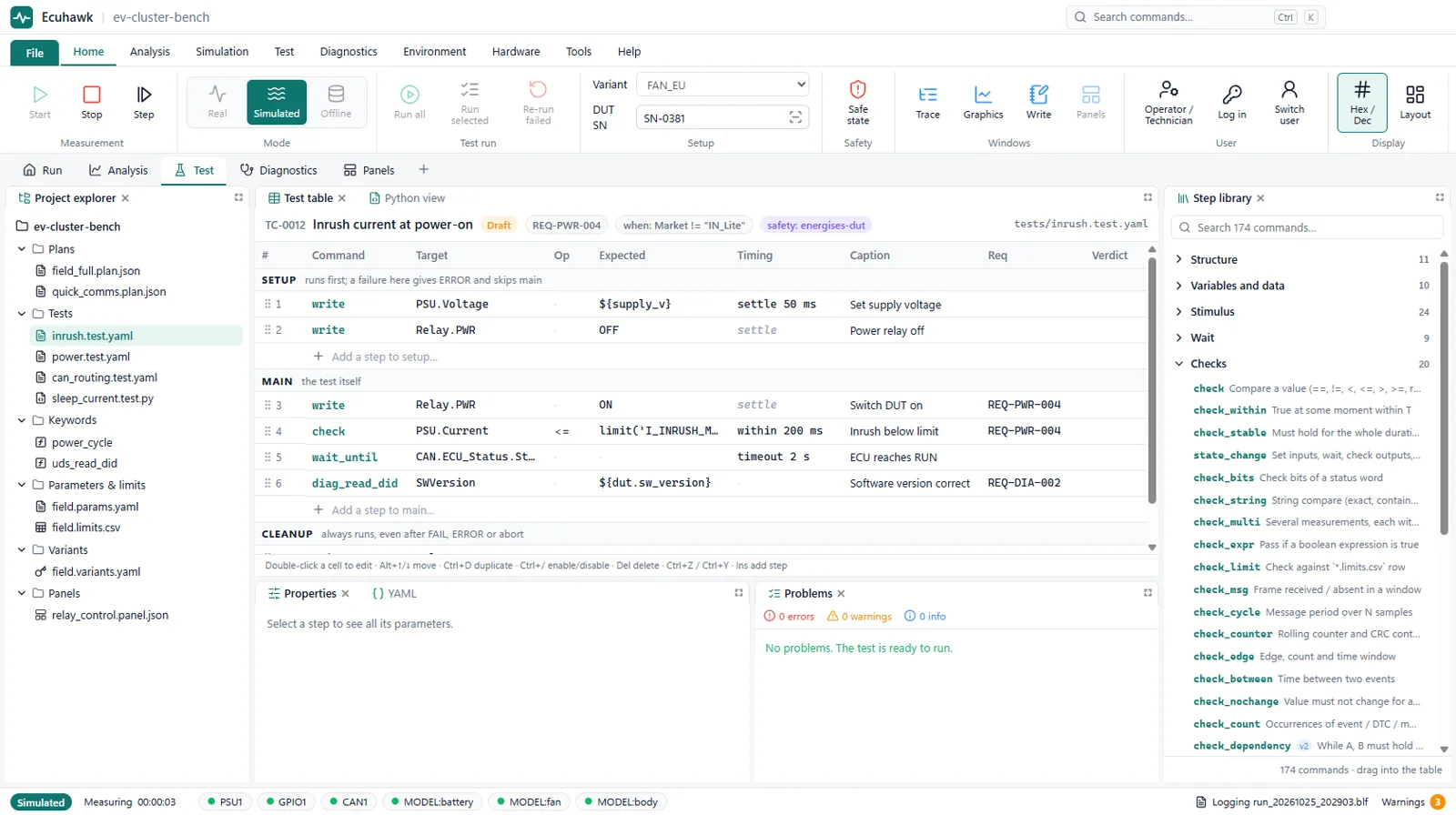
How a test is built
- Pick steps from the library. Drag them into the table, or type to search.
- Fill in the details. Signals, messages, relays and diagnostic services come from your DBC, ARXML, ODX or CDD files, so names are picked, not typed.
- Fix problems as you go. The problems panel flags unknown signals, missing limits and wrong values before you run. The engine checks the same rules again at run start.
- Run. Run one test, a selection or the whole project, on the bench or in simulation.
- Read the result. Each step is shown live with its measured value, and the run ends with a verdict and a report.
The step library
| Group | Examples |
|---|---|
| Stimulus | Write a signal, ramp, pulse, waveform, send cyclic frames, set supply voltage and current limit, switch relays, power cycle |
| Waits | Wait a time, wait until a condition, wait for a message, an event or the operator |
| Checks | Value, within limits, stable for a time, bits, text, cycle time, counters, edges, expression, statistics |
| Diagnostics | Session, read and write DIDs, read, check and clear DTCs, routines, ECU reset, tester present, raw request |
| Bus and faults | Stop a message, change its cycle or length, corrupt CRC, freeze counters, error frames, replay |
| Flow | If, loops, repeat until, try, parallel, data-driven cases and sweeps |
| Operator | Messages, confirmations, ask for a value, scan a serial number, show an image |
| Safety | Require an interlock, go to safe state, react to emergency stop |
| Report and logging | Measured values, tables, plots, images, recording start and stop, markers, verdict |
The runner already handles the core steps for stimulus, waits, checks, bus faults, UDS diagnostics and reporting. The remaining step types are being added during the beta.
Requirements and traceability
Each test can carry the ID of the requirement it covers. The ID appears in the test list, in the live results and in the report, so you can show which requirement passed or failed.
Built for safety on a real bench
- Bench limits and interlocks are checked by the engine on every write, whatever a test asks for.
- Any failure or stop puts every output back to its safe value.
- Tests can run against a simulated ECU first, before they touch hardware.
Three ways to create tests
- Test table: no code, for most engineers. See above.
- AI: describe the requirement in English and review the drafted steps. See AI test automation.
- Python: for custom logic. See scripting and coding.
Questions
Do I need to know programming to automate ECU tests in Ecuhawk?
No. Tests are built in a table from ready-made steps such as set voltage, wait for a message, check a signal and read DTCs. Python is available but optional.
How are Ecuhawk tests stored?
As plain YAML files (.test.yaml) in the project folder, so they can be reviewed, compared and kept in Git.
Can I link tests to requirements?
Yes. Each test can carry a requirement ID that is shown in the results and the report.
Can tests run without hardware?
Yes. Tests can run against a simulated bench and ECU, which is useful for checking a test before using it on real hardware.
Is it like vTESTstudio or ECU-TEST?
The idea is similar: tests are built from steps rather than written as code. Ecuhawk adds bench control, operator mode, AI drafting and Linux support in the same app.