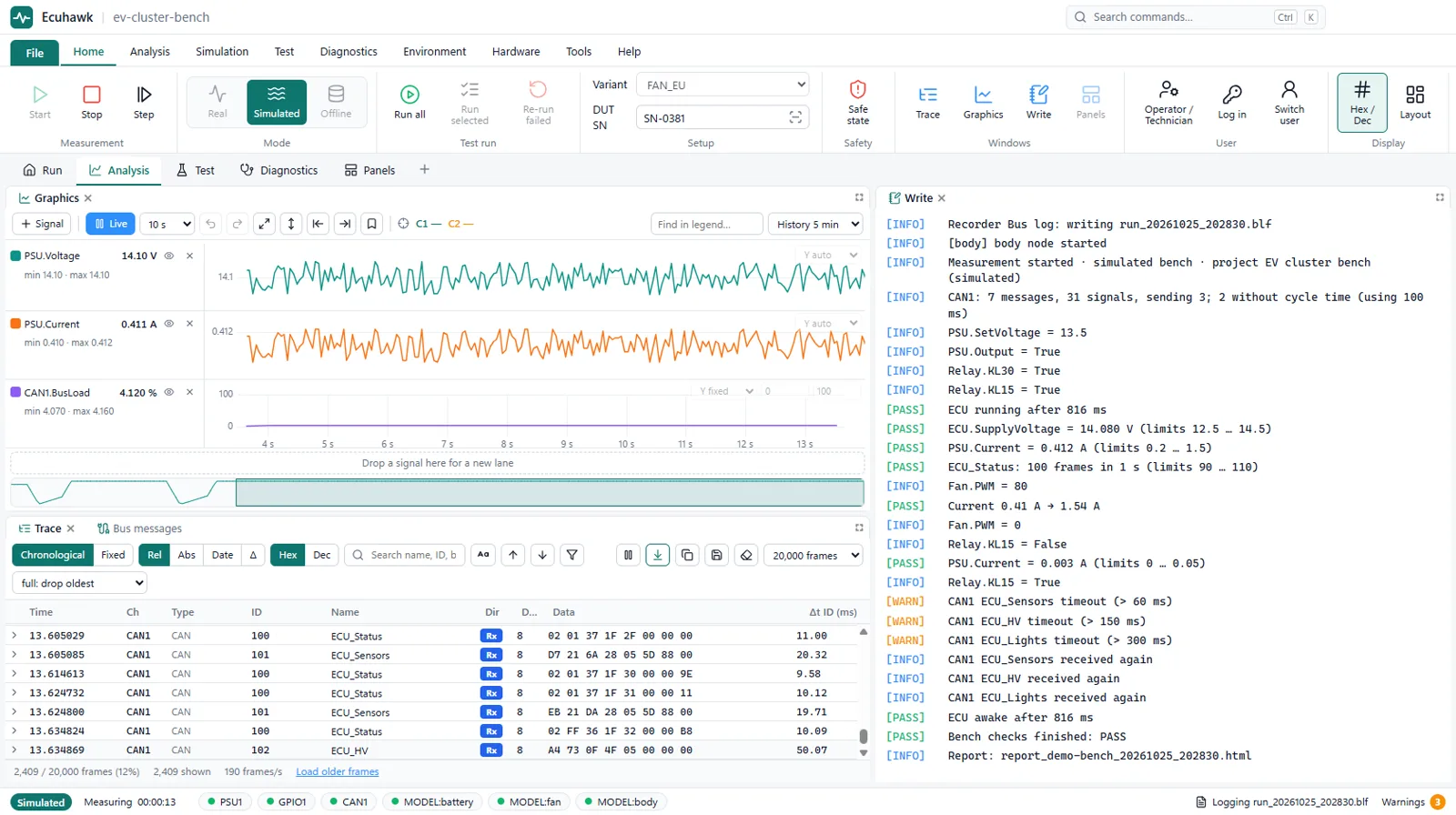
In short: Ecuhawk is a full CAN bus analyser: a decoded trace you can pause while capture continues, capture and view filters, multi-lane graphs with two measurement cursors, a data window, statistics with bus load and error counters, logging to BLF, ASC and MF4, offline analysis of saved logs, a frame sender, log replay and calculated signals.
Trace
- Pause (freeze) the view while capture keeps running in the background, so no frames are lost.
- Chronological view or fixed view (one row per ID with cycle time).
- DBC decoding, with the signals of any frame shown in place and their bytes marked.
- Search by name, ID or bytes, with next and previous match (F3, Shift+F3).
- Hex or decimal IDs, absolute or relative time, adjustable buffer size.
- Copy rows or save them as ASC.
Filters
- Capture filters decide what is stored. View filters decide what you see.
- Filter by ID, range, channel or name. Turn each filter on or off without deleting it.
Graphs and measurement
- Several signals in separate lanes on one time axis.
- Two measurement cursors show the time difference and frequency between events. The cursor is shared with the trace.
- Zoom, fit all, fit Y, jump to oldest or newest, and undo or redo the view.
- History is kept for every signal, so you can scroll back after the event.
Data window
Watch live values as numbers, bars, gauges, bits or text from value tables, in physical, raw, hex, binary or scientific format.
Statistics and bus health
- Min, max and mean of any signal, live or between the two cursors.
- Bus load and peak load per network, receive and transmit frame rates.
- Error frames, receive and transmit error counters and controller state, when the adapter reports them.
Logging and offline analysis
- Record to BLF, ASC and MF4, with triggers and several recorders at once.
- Open logs later with the same trace, graphs and statistics. Merge several files on time.
- Step frame by frame or 100 ms at a time, change playback speed, or load only a section.
- Export just the part between the two graph cursors.
Sending, replay and simulation
- Frame sender for single or cyclic frames.
- Replay a recorded log back onto the bus, step by step or at a chosen speed.
- Rest-bus simulation from DBC, ARXML and LDF to stand in for missing ECUs.
- Fault injection on simulated messages: freeze the alive counter, corrupt the CRC, delay a frame or change its length.
Calculated signals and markers
- New signals from formulas, with low-pass filter, moving average, peak, valley, rate of change, integral and edge count.
- Markers and an event list to note what happened and when.
Questions
Can I pause the CAN trace without losing frames?
Yes. Pausing in Ecuhawk freezes only the view. Capture and logging keep running, and the trace catches up when you resume.
Which log formats does Ecuhawk support?
Ecuhawk records and opens BLF, ASC and MF4 files.
Can Ecuhawk measure bus load?
Yes. The statistics window shows bus load, peak load, frame rates, error frames and error counters per network.
Is there a CAN bus analyser that runs on Linux?
Ecuhawk runs on Ubuntu 24.04 with SocketCAN, as well as on Windows, with the same analysis features on both.
Which CAN adapters work?
PEAK PCAN, Kvaser, SocketCAN interfaces on Linux and other common adapters.